Last updated: August 10, 2026
How does a multi-language template work?
Mitti Supports multiple languages in a single template, automatically showing the right language based on each user's device language settings. You control this by uploading translations directly to your template, so your whole team can complete inspections in their preferred language. This helps your team stay aligned and maintain consistent standards across every site, team, and location, without any manual configuration on their end.
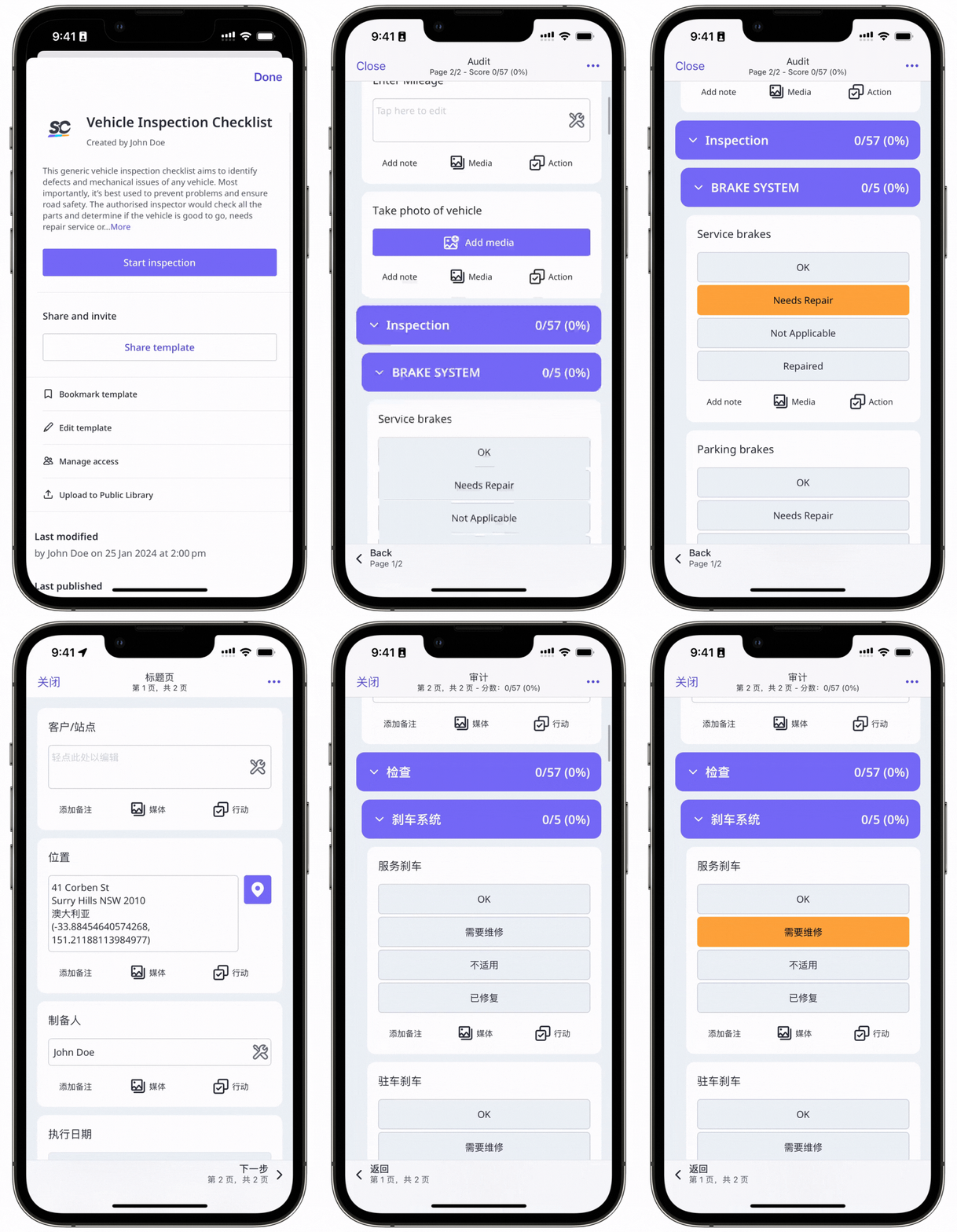
Take a look at this example of an inspection being started in English and Chinese using the same template:
What you'll need
With the Premium Plan, you can add one translation in addition to the template's original language. If you're on Enterprise Plan, you can add unlimited translations per template.
If you want to update a template for all languages, please make sure to update it in the template editor first. Then, follow the manage multi-language templates instructions to update the translations.
Add a template translation
Please note that we do not automatically provide translations for downloaded templates. If you want to add translations, you have to create them for each question and add them manually to the translation CSV file.
The following is not a complete list of language codes from around the world. However, all language codes in the list should be fully supported by both Android and iOS devices when recognizing provided languages.
Code | Language |
|---|---|
ar | Arabic |
ar-EG | Arabic (Egypt) |
ar-IL | Arabic (Israel) |
bg | Bulgarian |
ca | Catalan |
zh-CN | Chinese, Simplified |
zh-HK | Chinese, Traditional (Hong Kong) |
zh-TW | Chinese, Traditional (Taiwan) |
hr | Croatian |
cs | Czech |
da | Danish |
nl-NL | Dutch (Netherlands) |
nl-BE | Dutch (Belgium) |
en-AU | English (Australia) |
en-GB | English (United Kingdom) |
en-US | English (United States) |
fi | Finnish |
fr-CA | French (Canada) |
fr-BE | French (Belgium) |
fr-CH | French (Switzerland) |
fr-FR | French (France) |
de-DE | German (Germany) |
de-AT | German (Austria) |
de-LI | German (Liechtenstein) |
de-CH | German (Switzerland) |
el | Greek |
he | Hebrew |
hi | Hindi |
hu | Hungarian |
id | Indonesian |
it-IT | Italian (Italy) |
it-CH | Italian (Switzerland) |
ja | Japanese |
kk | Kazakh |
ko | Korean |
ms | Malay |
no | Norwegian |
pl | Polish |
pt-BR | Portuguese (Brazil) |
pt-PT | Portuguese (Portugal) |
ro | Romanian |
ru | Russian |
sk | Slovak |
es-MX | Spanish (Latin America) |
es-ES | Spanish (Spain) |
sv | Swedish |
th | Thai |
tr | Turkish |
uk | Ukrainian |
vi | Vietnamese |
sr | Serbian |
sl | Slovenian |
tl | Tagalog |
Limitations
Reports can only be viewed and generated in languages supported on the web app.
Responses for questions using Global Response Sets, Sites, and Assets can't be translated.
Media attachments can't be translated.
Multi-language is not supported for exporting inspections as CSV or Excel.
Multi-language is not available in Analytics for response breakdowns and question filters.
Frequently asked questions
Need more help?
Was this page helpful?
