Last updated: September 29, 2026
This feature is currently in Preview. As we continue developing this feature, its functionality and availability may change before its full release.
Why share agent chats?
Sharing an agent chat gives your teammates the full context behind a task. The shared chat is view-only and shows the whole conversation: each step the agent took and the result. Share a chat when a teammate needs to review the agent's work or understand how it reached that result.
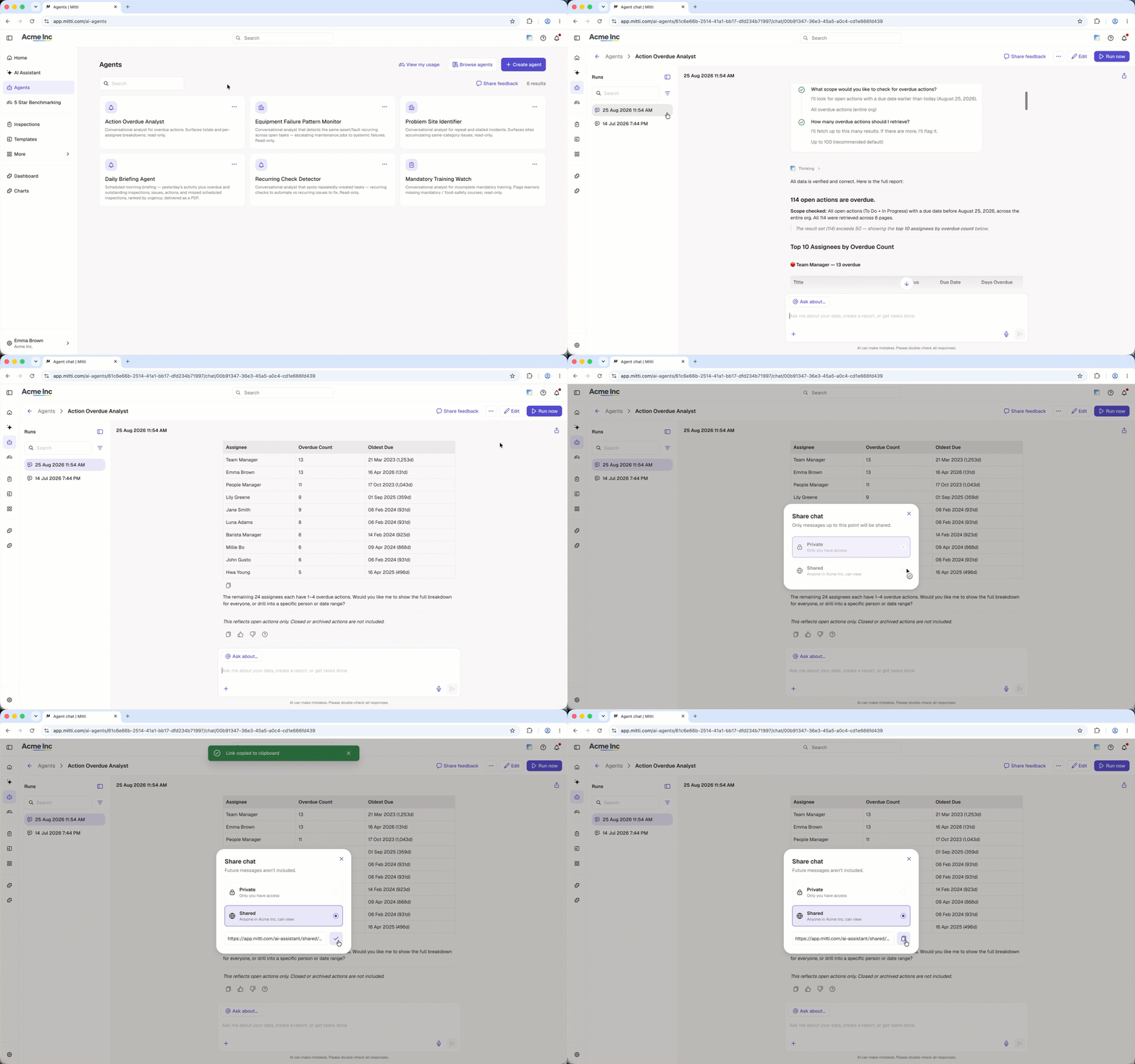
Share an agent chat
Click Agents in the sidebar.
Select the agent that has the chat you want to share.
On the left-hand side of the page, select the chat you want to share from the Runs list.
Click on the upper-right of the chat.
In the pop-up window, click Shared to view the shareable link.
Click to copy the link. You'll see a confirmation that the link was copied.
Share the copied link with your team so they can view the chat.
A shared agent chat shows the conversation as it was at the time you shared it. Any messages sent after that point do not appear in the shared chat.
Frequently asked questions
Need more help?
Was this page helpful?