Zuletzt aktualisiert: 20. August 2024
Was Sie brauchen
Hier sind ein paar Dinge, die Sie überprüfen sollten, um eine erfolgreiche Synchronisierung zu gewährleisten:
Die mobile Mitti-App ist auf dem neuesten Stand.
Ihr Mobilgerät eine Internetverbindung hat.
Synchronisieren einer Inspektion wiederholen
Open the mobile app.
Tap Inspektionen in the navigation bar or select it from Mehr.
Select Im Gange und Abgeschlossen tab at the top of your screen.
Inspections with errors should appear at the top of the list.
Tap the inspection, and then tap Erneut versuchen.
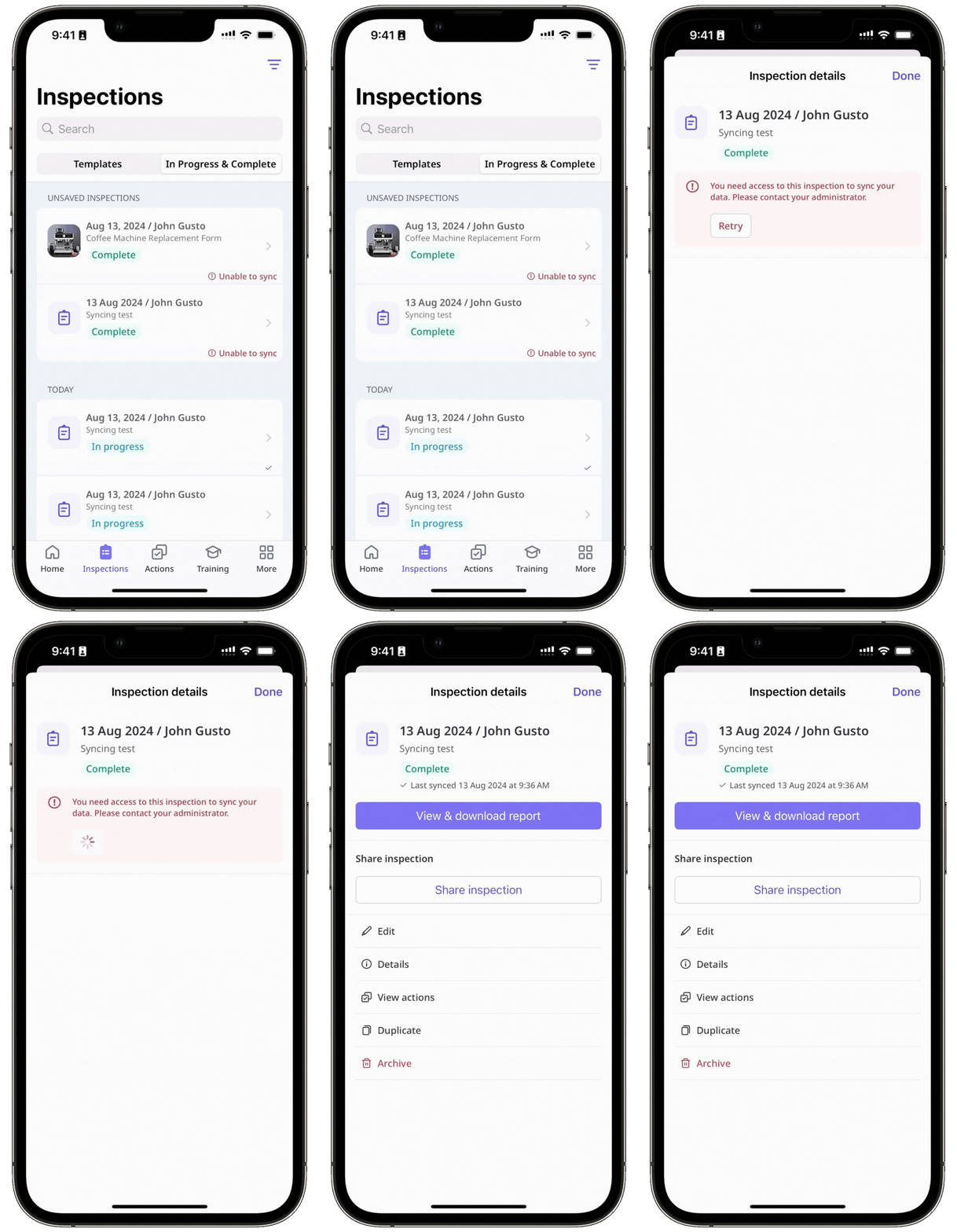
Depending on the error, the retry may succeed. If retrying continues to fail, please refer to the inspection errors outlined in this article and resolve the error accordingly.
Fehler bei der Inspektionsbearbeitung
Fehler beim Start der Inspektion
Fehler beim Duplizieren der Inspektion
Fehler beim Archivieren der Inspektion
Zugriffsfehler
Brauchen Sie weitere Hilfe?
War diese Seite hilfreich?