Última actualización: 7 de octubre de 2026
What is Agenda?
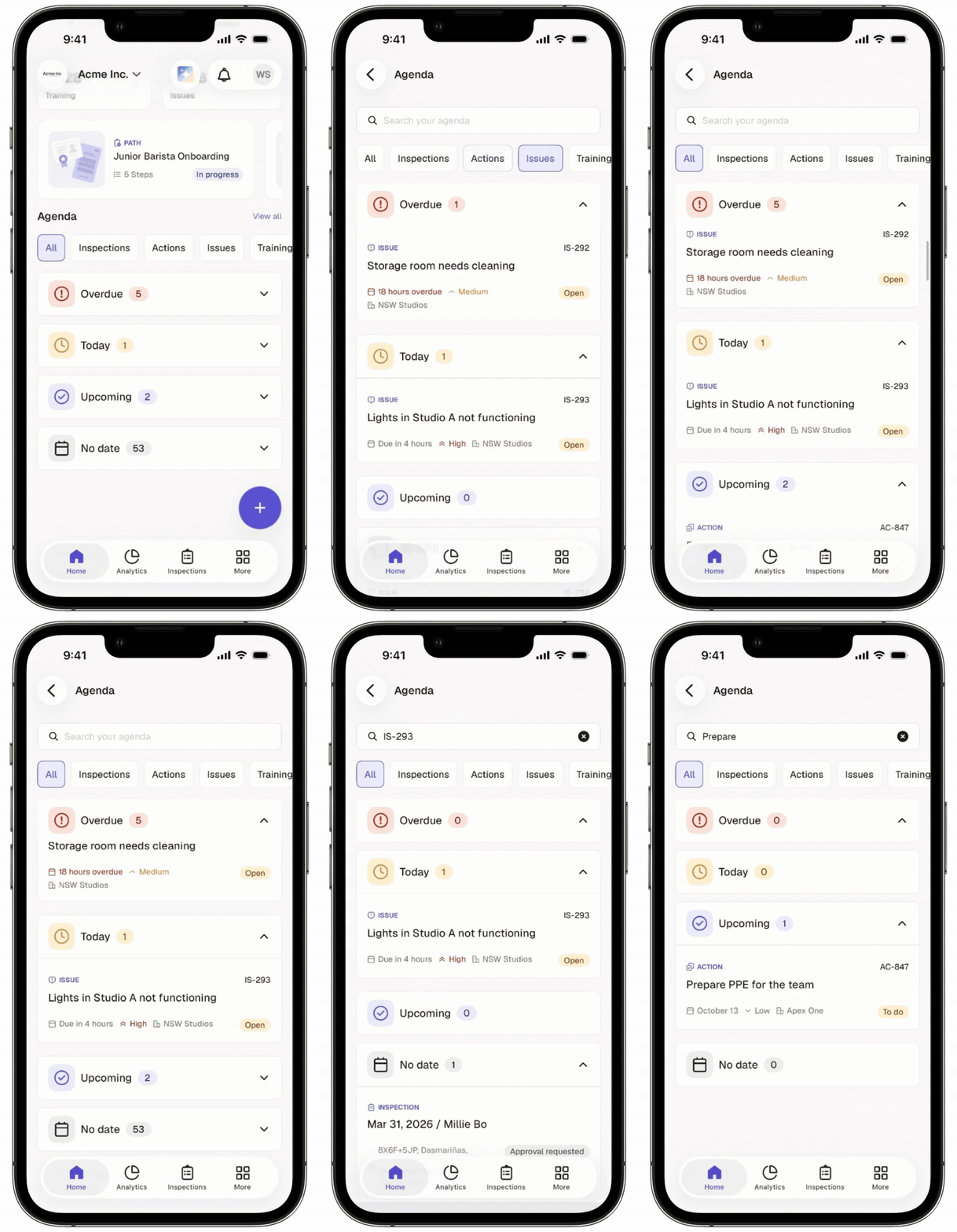
Agenda in Mitti is your to-do list. It brings your assigned work from Inspections, Actions, Issues, and Training into one view, so you can see what needs your attention next. Items are grouped by due date, and items without a due date stay visible. You can review everything due today and any overdue items before you start your day.
You can also search your Agenda items on the mobile app by details such as an item's title, site name, and more. Search lets you find an item without scrolling through a long list. It works on Agenda items that are synced to your device, so you can use it online or offline.
Puede ver la Agenda sin conexión, pero es posible que algunas funciones no estén disponibles. Si una función no es compatible sin conexión, verá un mensaje de error.
What can I see in Agenda?
Agenda brings all your assigned tasks into one place. Here, you can view:
Inspections
Actions
Issues
Training
Section | Description |
|---|---|
Overdue | Items with due dates that have already passed. Items with a start and end date become overdue once the end date has passed. |
Today | Items with due dates set for today. Items that were due earlier today remain in this section until the end of the day (midnight). Items where the current date falls between the start date and end date. |
Upcoming | Items with due dates after today. Items where the current date is before the start date. |
No date | Items without a due date. |
Date and time are displayed based on your device's time zone.
Lo que necesitarás
Ver los elementos de mi Agenda
Abra la aplicación móvil.
Toque Inicio en la barra de navegación.
Toque Ver todo en la parte derecha de la sección «Agenda».
Toque Todo, Inspecciones, Acciones o Contratiempos para ver los elementos de cada filtro.
Toque Vencida, Hoy, Próximamente o Sin fecha para ver los elementos que se encuentran en ese estado.
Si quiere buscar un elemento concreto de la Agenda, toque la barra de búsqueda e introduzca el título, la identificación de la Acción, la identificación del Contratiempo, la descripción del curso o el nombre del sitio para ver los elementos que coincidan.
Necesita la versión 26.40 o posterior de la aplicación móvil para buscar elementos de su Agenda. Si no ve la barra de búsqueda, actualice la aplicación móvil.
¿Necesitas más ayuda?
¿Fue útil esta página?