Last updated: October 1, 2026
What is the Sign On dashboard?
The Sign On dashboard gives you an overview of attendance across your organization’s projects. It brings together sign-on activity so you can see how many people are currently on site, review sign-on and sign-off trends, identify common arrival and departure times, and open kiosk mode to sign people on or off for a selected site
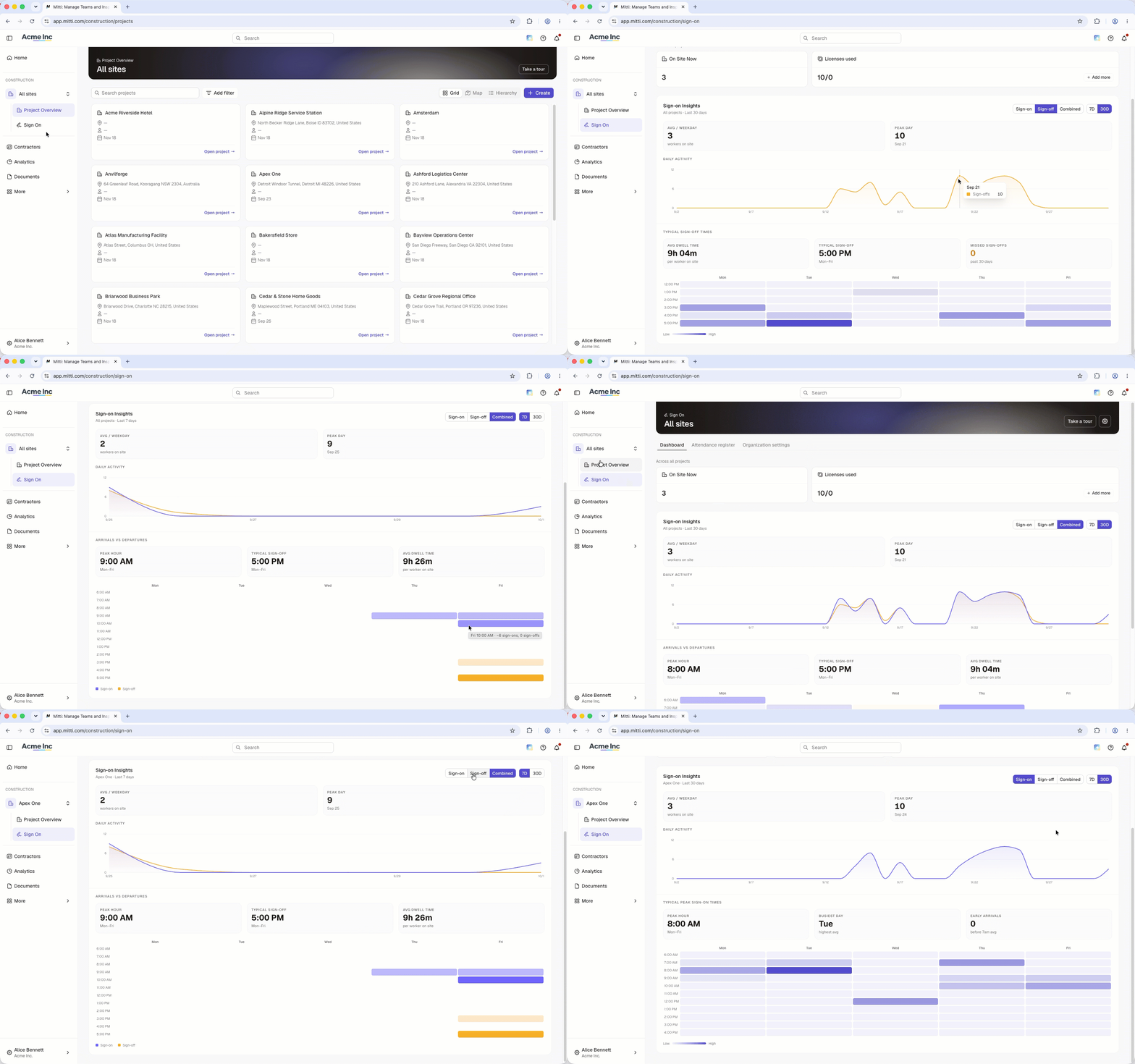
Sign On dashboard data
What you'll need
View Sign On dashboard
In the Construction module, click All sites from the sidebar, then select the site.
Click Sign On.
In Dashboard, click Sign-on, Sign-off, or Combined to filter the data shown across your charts.
Click 7D or 30D to change the reporting period from the last 7 days or 30 days.
Hover over a chart to view sign-on or sign-off activity for a specific date or time.
Make sure sign-on and sign-off records have the correct times so your dashboard accurately reflects site activity. You can edit sign-on and sign-off times, or sign a person off from the Attendance register.
Need more help?
Was this page helpful?