Last updated: June 8, 2026
What happens when you delete a file from an action?
When you delete a file from an action, it's permanently removed from the action and can't be recovered. The action's activity timeline records who deleted it and when, so there's still a traceable history of what changed. This keeps action records accurate so your team can assign, follow up on, and complete actions with confidence.
What you'll need
If you have "Data management: Manage all data" permission, you can also delete files uploaded in actions by other users in the organization.
Deleting is irreversible, and we cannot restore permanently deleted items. Confirmation is always required before any deletion, so be sure you're not accidentally deleting the wrong item.
Delete a file in an action
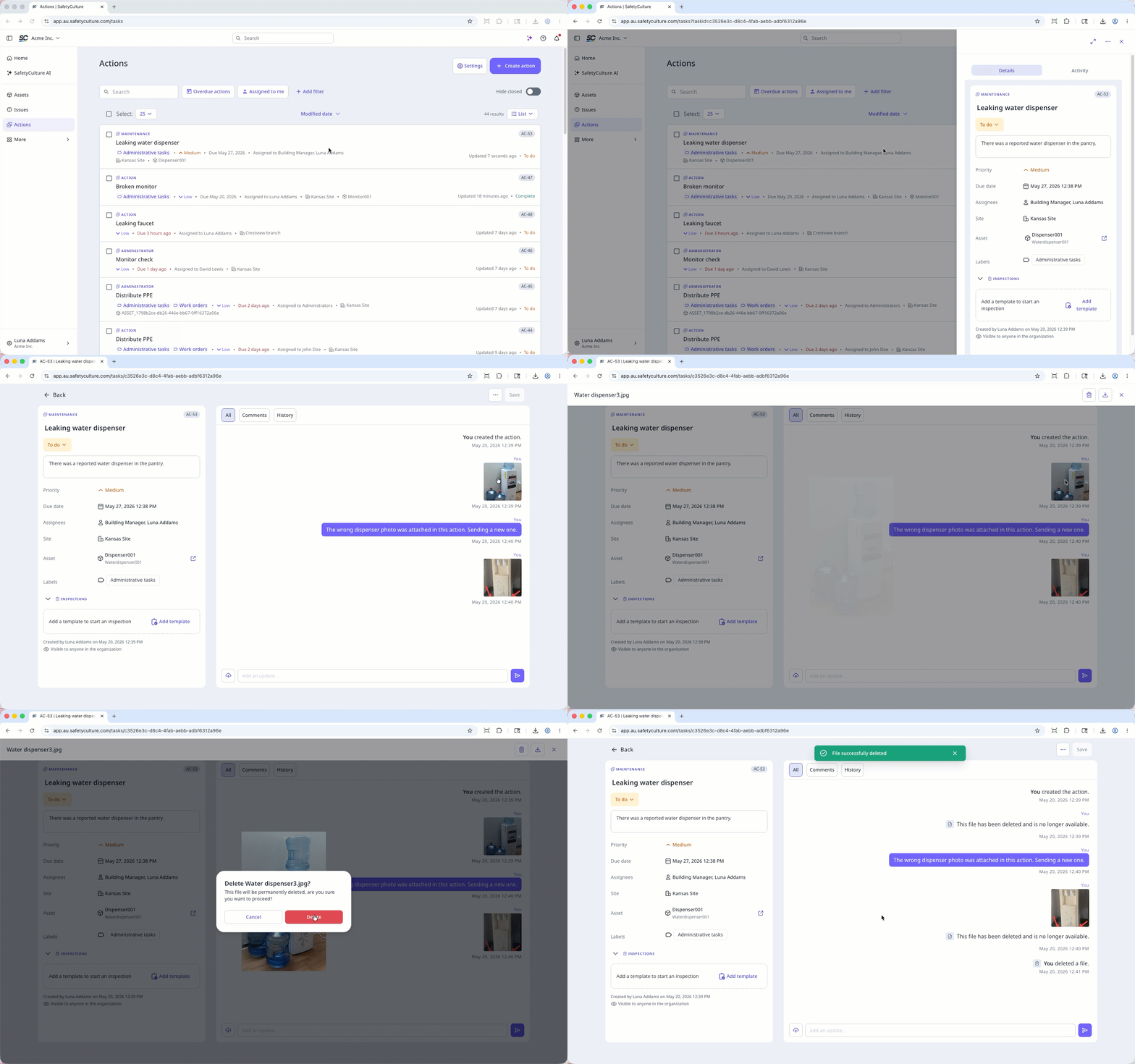
Select Actions in the sidebar or in More.
Select between List, Calendar, or Board on the upper-right of the page to view the actions.
Select an action.
Click Activity on the upper-right of the page.
Click the file to preview.
Click on the upper-right of the media preview.
In the pop-up window, click Delete.
Open the mobile app.
Tap Actions in the navigation bar or select it from More.
Tap Activity tab at the top of your screen.
Tap the file you want to delete.
Tap at the bottom of your screen.
In the pop-up window, tap Delete to confirm.

Frequently asked questions
Need more help?
Was this page helpful?
