Last updated: July 21, 2026
This feature is currently in Preview. As we continue developing this feature, its functionality and availability may change before its full release.
Why schedule agent runs?
Scheduling allows your agent to run automatically at the times you choose, instead of you starting it manually each time. Your agent performs the checks and analysis in the background, which helps you automate recurring tasks while you focus on reviewing the results. Each scheduled run is saved as a report you can review anytime. You can also turn on notifications when configuring an agent, so you're notified right away if a run succeeds or fails.
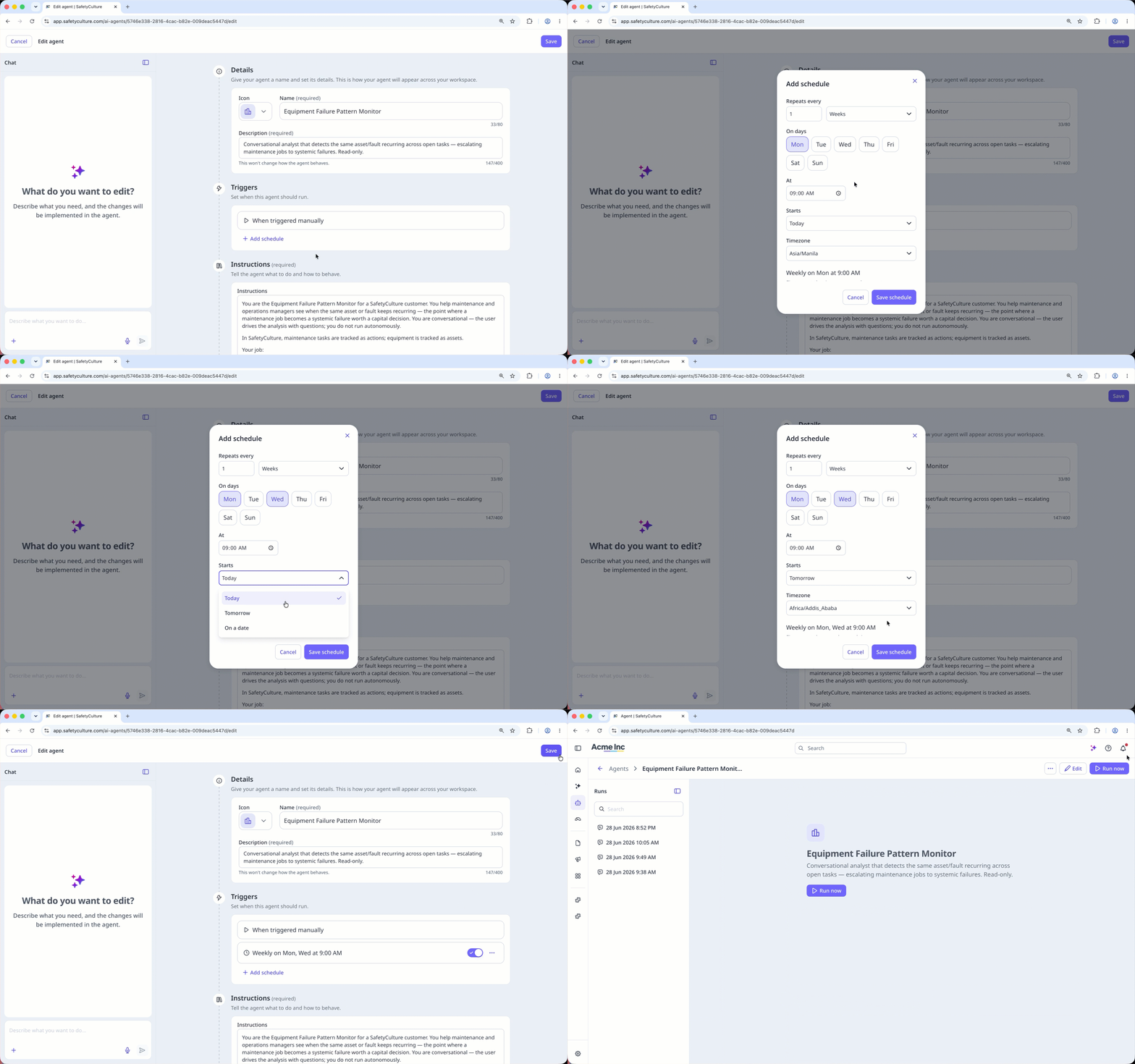
Schedule an agent run
Click Agents in the sidebar.
Click on the upper-right of the agent you want to schedule and select Edit, or create a new agent.
In the "Triggers" section, click Add schedule.
In the pop-up window, set how often the agent should run, the start date, and the timezone. Then, click Save schedule.
Click Save on the upper-right corner of the page.
Frequently asked questions
Need more help?
Was this page helpful?
