Dernière mise à jour: 26 août 2026
What does it mean to upload data in 5 Star Benchmarking?
Uploading your business data in 5 Star Benchmarking gives additional context beyond your sites' actions, issues, and inspection activities. This data can include customer satisfaction surveys, mystery shopper reports, location sales and revenue, customer feedback, staff training records, and equipment logs. By analyzing these internal and external data sources, 5 Star Benchmarking generates AI-powered site insights that identify trends and provide a better picture of your sites' performance.
L'importation de données renforce les informations générées par l'IA et l'évaluation de puissance des données uniquement. Cela n'a aucune incidence sur l'évaluation sur 5 étoiles.
Ce dont vous aurez besoin
Importer des données dans 5 Star Benchmarking
Click 5 Star Benchmarking in the sidebar.
Click Recommandations de l'IA on the upper-right corner of the page.
In the Site performance section, click Importer des données on the right side.
In the pop-up window, click Parcourir to select your files, or drag and drop them in the file upload tile.
Click Ajouter to upload your files.
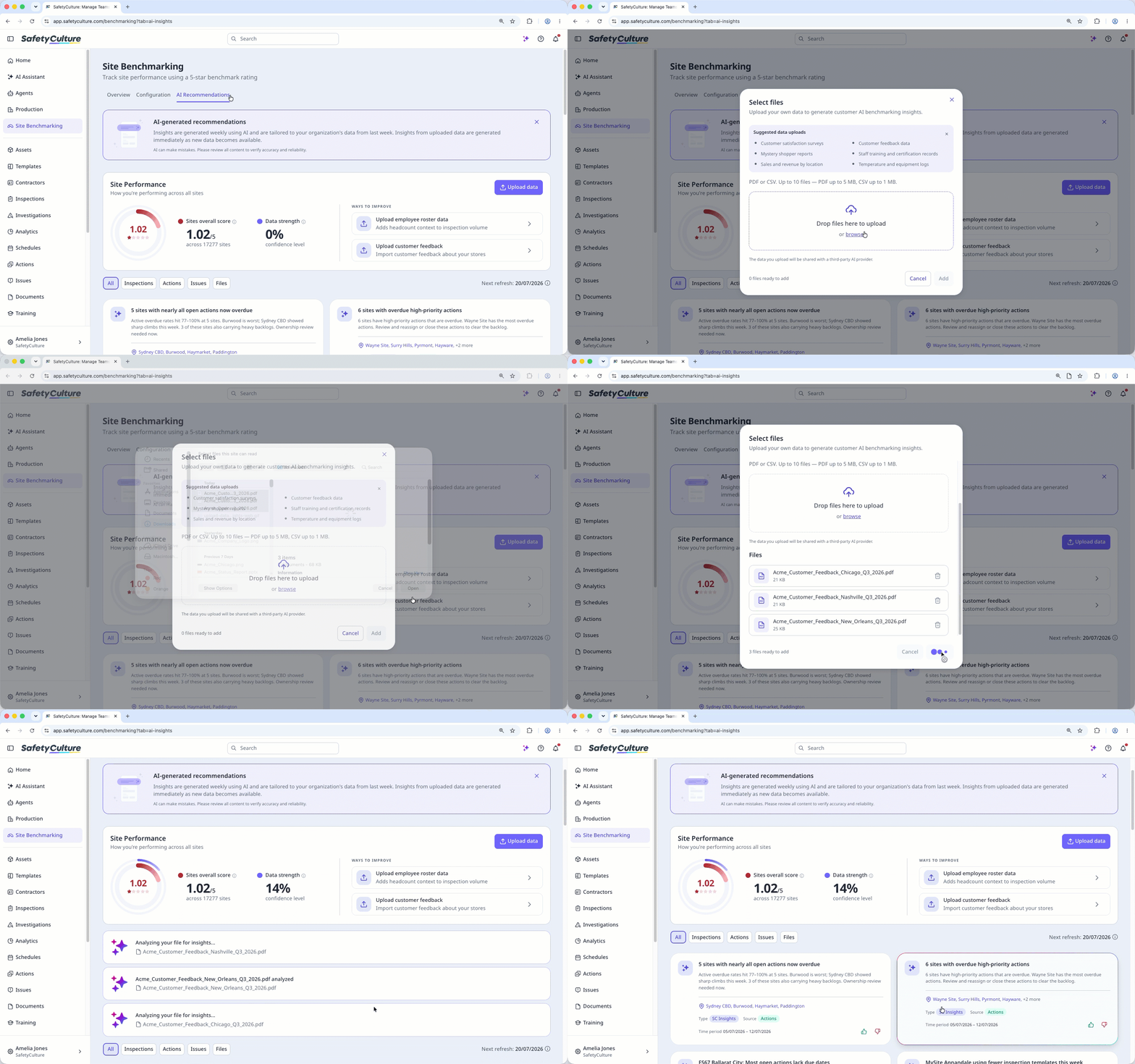
Les fichiers que vous téléchargez sont stockés dans Documents.
Limitations
Vous pouvez importer des fichiers jusqu'à 5 Mo aux formats PDF et CSV.
Si votre organisation utilise Offre Premium ou Offre Enterprise, vous pouvez ajouter jusqu'à 10 000 fichiers.
Si votre organisation utilise la version Offre Gratuite vous pouvez ajouter jusqu'à 100 fichiers.
Vous pouvez télécharger jusqu'à 10 fichiers par jour.
Vous pouvez glisser-déposer jusqu'à 10 fichiers en une seule fois.
Besoin d'aide supplémentaire?
Cette page vous a-t-elle été utile?
